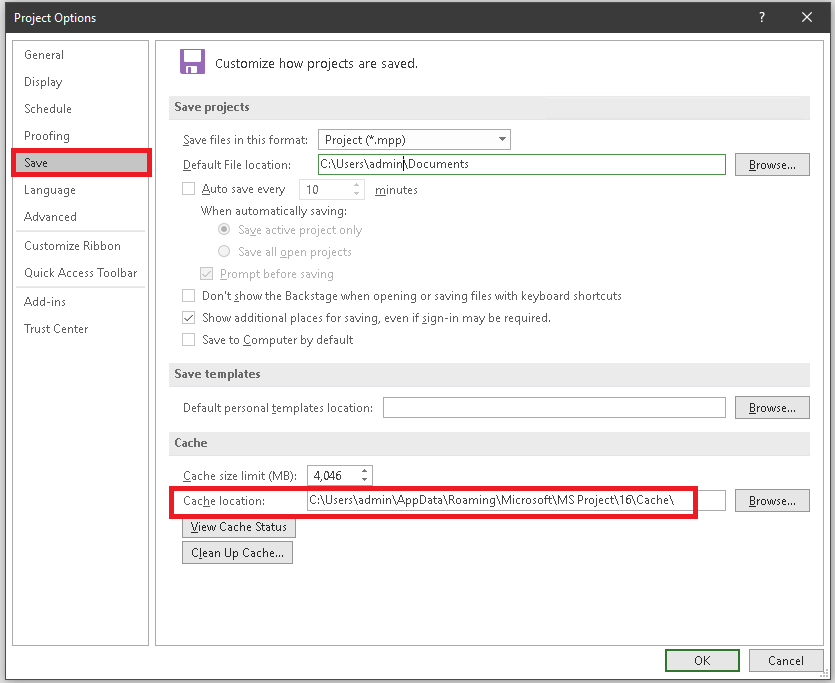
If a Project Pro 2016 user receives an error message that their project is checked out when it isn't1 the cause my be a corrupt cache. You can try the steps below to resolve the error:
Clearing the cache (direct file deletion method):
1. Launch Microsoft Project
2. Navigate to File-Options-Save
3. In the 'Cache' section, toward the bottom will be an address for the cache. Please copy this
4. Exit Microsoft Project
5. Launch Windows Explore/File Explorer and navigate to the cache location (paste the address from the copy buffer)
6. The Cache folder should contain one or more sub folders
7. Delete the sub folders (DO NOT delete the top level cache folder!!)
8. Relaunch Microsoft Project
Note: the cache folder is normally at: C:\Users\YOUR USER NAME\AppData\Roaming\Microsoft\MS Project\16\Cache\
1. You can find out if your project is checked out by going to Project Centre (ribbon) ->Check in My Projects
Screenshot of the Options dialogue box